
What Is AI Content Indexing?
AI Content Indexing is the process of converting your forum content into a format that AI features can understand and search. Instead of matching exact keywords like traditional search, AI indexing captures the meaning behind each topic and reply.
When your content is indexed, each post is converted into a numerical representation called a vector embedding — a series of numbers that encodes what the text means. These vectors allow the system to find content that is conceptually similar to a user’s query, even when the exact words are different.
wpForo offers two ways to store these indexed vectors: Local Storage (in your WordPress database) and Cloud Storage (in dedicated cloud infrastructure). Both enable semantic search, but they differ significantly in how they process, store, and search your content.
Two Storage Modes
Local Storage
Vector embeddings are stored in your WordPress database. Search runs directly on your server using PHP.
- Subscription plan: All
- Vectors saved in your MySQL database
- Search computed by your web server
- Good for small to medium forums
- No external storage dependency
Cloud Storage
Vector embeddings are stored in dedicated cloud infrastructure with optimized search algorithms.
- Subscription plan: Business+
- Vectors stored in purpose-built cloud index
- Search powered by specialized algorithms
- Scales to any forum size
- No database or server load
Full Feature Comparison
| Feature | Local Storage | Cloud Storage |
|---|---|---|
| Embedding generation | Via cloud API (vectors returned to your server) | Entirely in the cloud (processed and stored remotely) |
| Vector storage | Your WordPress MySQL database | Dedicated cloud vector index (isolated per forum) |
| Search method | PHP-based sequential comparison | Optimized k-nearest-neighbor (k-NN) algorithms |
| Search scope | Processes vectors in batches of 2,000 | Searches entire index in a single operation |
| Search quality at scale | May miss best matches on large forums | Always finds the closest matches across all content |
| Search speed (100K+ posts) | Slower — CPU-bound computation on your server | Near-instant — sub-second regardless of forum size |
| Database impact | ~3–4 MB per 1,000 topics | Zero — no data added to your database |
| Server CPU load | Each search query uses CPU for vector math | Zero — search runs on cloud infrastructure |
| Result caching | Similar topics cached for 1 hour locally | Fresh results every time (fast enough without cache) |
| Image & document indexing | Supported (processed one at a time) | Supported (processed in parallel on cloud) |
| Deduplication | Local two-stage (group + fingerprint) | Server-side intelligent deduplication |
| Recommended forum size | Under 50,000 posts | Any size |
How the Embedding Process Differs
Embedding is the process of converting text into numerical vectors. Both modes use the same high-quality AI model with high-dimensional vectors. The difference is in how and where this process happens.
Local Mode: Two-Step Process
↓
Sent to Cloud API (batches of up to 100 items)
↓
AI Model Generates Vectors
↓
Vectors Returned to Your Server
↓
Stored in Your WordPress Database (binary format)
In local mode, your content is sent to the cloud API to generate embeddings, but the resulting vectors are returned to your server and stored in your WordPress database. This means:
- Your database grows by ~3–4 MB for every 1,000 topics indexed
- Large batches are limited to 100 items per API call, requiring multiple round trips
- Images and documents must be processed one at a time
- Your server stores and manages all vector data
Cloud Mode: Fully Managed Process
↓
Sent to Cloud Infrastructure
↓
AI Model Generates Vectors
↓
Vectors Stored in Dedicated Cloud Index
(optimized for fast retrieval — nothing returns to your server)
In cloud mode, the entire embedding process happens remotely. Your content is sent to the cloud, processed, and stored in a dedicated vector index built specifically for fast search. Nothing comes back to your database.
- Zero impact on your WordPress database size
- Background processing — content is queued and processed asynchronously
- All content types (text, images, documents) processed efficiently
- Your forum gets a dedicated, isolated index for complete data separation
Why Cloud Delivers Better Search
The most significant difference between the two modes is not just speed — it’s search quality. Cloud mode finds better, more relevant results.
How Local Search Works
When a user searches in local mode, your WordPress server must:
- Generate a query vector The search query is sent to the cloud API to create a vector embedding (this step is the same in both modes).
- Load vectors from the database in batches Your server loads stored vectors from MySQL in groups of 2,000 at a time, to avoid running out of memory.
- Calculate similarity one by one For each stored vector, PHP calculates a mathematical similarity score (cosine similarity). This is pure CPU computation on your server.
- Sort and return results After checking all batches, the top results are sorted and returned.
How Cloud Search Works
Cloud search takes a fundamentally different approach. Instead of comparing the query against every vector one by one, the cloud index uses k-nearest-neighbor (k-NN) algorithms — data structures specifically designed to find the most similar items without scanning everything.
Think of it like the difference between looking through every book in a library one by one (local), versus using the library’s cataloging system to go straight to the right shelf (cloud).
Local Search
- Sequential comparison (one by one)
- Processes vectors in batches of 2,000
- CPU-intensive on your web server
- Lower similarity scores (5–25% range)
- May miss relevant results at scale
- Caches similar topics for 1 hour
Cloud Search
- Indexed search (goes directly to best matches)
- Searches entire index in one operation
- Zero load on your web server
- Higher similarity scores (30–90% range)
- Always finds the best matches
- Fresh results every time (no stale cache)
Performance at Scale
As your forum grows, the performance gap between local and cloud storage widens dramatically.
| Forum Size | Local Search Time | Cloud Search Time | Local DB Size Added |
|---|---|---|---|
| 5,000 posts | Fast (milliseconds) | Fast (milliseconds) | ~15–20 MB |
| 50,000 posts | Noticeable delay | Fast (milliseconds) | ~150–200 MB |
| 250,000 posts | Slow (seconds) | Fast (milliseconds) | ~750 MB – 1 GB |
| 1,000,000+ posts | Very slow / impractical | Fast (milliseconds) | ~3–4 GB+ |
Why the Gap Grows
Local mode has a linear relationship with content size: more posts means more vectors to compare on every search query. Your server does more work, searches take longer, and the database keeps growing.
Cloud mode uses indexed data structures that scale logarithmically — even if your forum doubles in size, search time barely increases. The search algorithm navigates directly to the most relevant results without examining every single vector.
Which Mode Should I Use?
| Under 10,000 posts | Local — Excellent performance, no external storage needed |
| 10,000 – 50,000 posts | Local — Good performance. Cloud available if you want faster searches and zero DB growth |
| 50,000 – 100,000 posts | Cloud recommended — Local search slows down and adds hundreds of MB to your database |
| 100,000 – 500,000 posts | Cloud strongly recommended — Local search becomes impractically slow |
| Over 500,000 posts | Cloud essential — Only cloud mode can deliver usable search at this scale |
Beyond Scale: Other Reasons to Choose Cloud
- Better search accuracy — k-NN algorithms find more precise matches than sequential comparison
- Zero database growth — your WordPress database stays lean
- No server CPU overhead — search processing happens remotely
- Fresh results — no 1-hour caching delay on similar topics
- Future-proof — your search stays fast as your forum grows
What Gets Indexed
When you index your forum, the following content is processed and made searchable:
- Topic titles and body content
- All replies within each topic
- Author display names
- Forum names and topic URLs
- Dates (when topics/replies were created)
- Solved status and best answer flags
- Like/vote counts
- Image and document content (Professional plan and above)
How Content Is Processed
Each topic and its replies are split into smaller, overlapping chunks of text. Each chunk is then converted into a high-dimensional vector by an AI model. These vectors capture the meaning of the text, not just the keywords. When someone searches, their query is converted into a vector the same way, and the system finds the closest matching content vectors.
Your Data & Privacy
We understand your forum data is valuable. Here’s exactly what happens with it in each mode:
Cloud Storage Mode
Content is sent to secure cloud infrastructure for processing and storage. Each forum gets its own isolated, dedicated index — your data is completely separated from other forums. All data is encrypted both in transit and at rest.
Local Storage Mode
Content is sent to the cloud API only to generate vector embeddings. The resulting vectors are returned to your server and stored in your WordPress database. The cloud does not permanently store your content in local mode.
Never Sent or Stored
- User passwords
- Email addresses
- IP addresses
- Private topics or unpublished drafts
- WordPress admin credentials or configuration data
Getting Started
Please note that Cloud Storage is only available fro Business and higher subscription plans. Only the Local Storage is available for the Free, Starter and Professional plans.
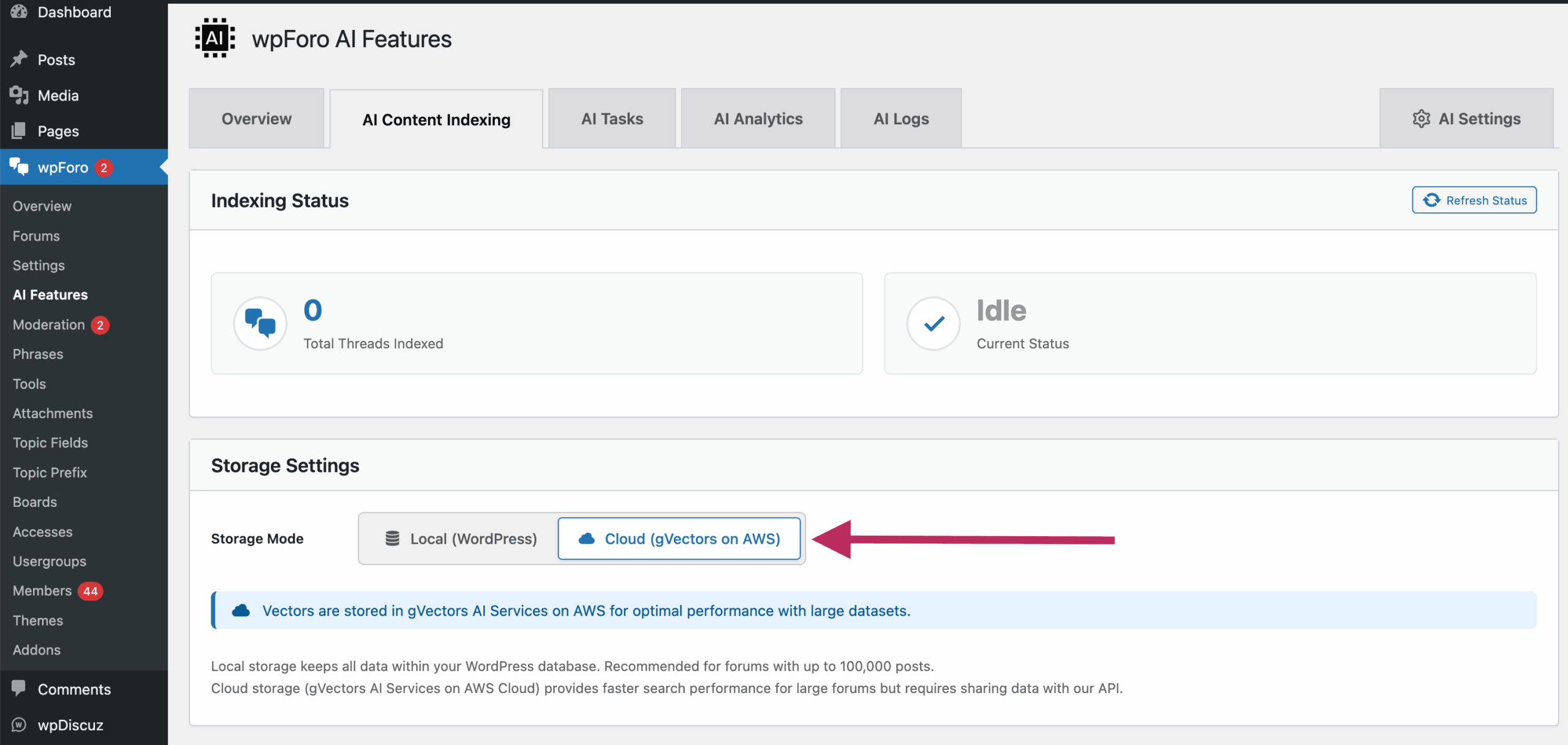
- Choose Your Storage Mode Go to wpForo Settings > AI Features and select either Local or Cloud (gVectors on AWS) storage mode. For forums over 50,000 posts, we recommend Cloud.
- Start Indexing Go to AI Features > Content Indexing and click Start Indexing. You can index your entire forum or select specific forums, date ranges, or tags.
- Monitor Progress The indexing progress bar shows how many topics have been processed. For very large forums, you can index in batches — for example, one forum at a time.
- Done — AI Features Are Active Once indexing completes, semantic search, topic suggestions, and related topics are automatically enabled for your users.
AI Features Powered by Indexing
Once your content is indexed, several AI-powered features become available to your users:
Semantic Search
Users find relevant threads by meaning, not just keywords. Great for technical forums where users may not know the exact terminology.
Topic Suggestions
When someone starts creating a new topic, the system suggests existing topics that discuss the same subject — reducing duplicate threads.
Related Topics
Shown alongside topics your users are reading, helping them discover relevant discussions and keeping them engaged.
AI Chatbot
An AI assistant that answers questions using your forum’s knowledge base. It references actual forum discussions in its responses.
Frequently Asked Questions
Can I switch between Local and Cloud mode?
Yes. You can switch storage modes at any time in the settings. After switching, you’ll need to re-index your content in the new mode. Your original forum data is never affected — only the search index changes.
If both modes use the cloud API to generate embeddings, why is cloud mode better?
The embedding generation is the same quality in both modes. The difference is in storage and search. Cloud mode stores vectors in a purpose-built search index using k-NN algorithms that find the best matches instantly across your entire content. Local mode stores vectors in your MySQL database and searches them sequentially using PHP, which is slower, uses your server’s CPU, and may miss the best matches on large forums.
Does indexing affect my forum’s performance?
No. Indexing runs in the background and processes content in small batches. Your forum remains fully usable during indexing. In Cloud mode, the heavy processing happens on external infrastructure, so there’s virtually no impact on your hosting.
How much database space does Local mode use?
Approximately 3–4 MB per 1,000 indexed topics. For a forum with 10,000 topics, that’s about 30–40 MB. For 100,000 topics, that’s 300–400 MB. For very large forums (500,000+ topics), this can reach several gigabytes. Cloud mode uses zero database space.
Does indexing use credits?
Yes, indexing consumes credits from your plan. The base cost is 1 credit per topic (including all its replies). Re-indexing unchanged content does not consume additional credits — only new or modified content uses credits.
What happens if I delete a topic?
When you delete a topic from your forum and run indexing, its vectors are automatically removed from the index. In Cloud mode, this happens during the next sync. No manual cleanup is needed.
Is my data secure in Cloud mode?
Yes. Your forum content is stored in an isolated, encrypted environment. Each forum has its own dedicated index — your data is completely separated from other forums. All data transmission uses encryption in transit (TLS).
Can I index only specific forums or topics?
Yes. The indexing interface lets you filter by forum, date range, topic tags, or even specific topic URLs. This is especially useful for large forums where you want to index content gradually.
Why do local search scores look different from cloud search scores?
Local search produces lower similarity scores (typically 5–25%) while cloud search produces higher scores (30–90%). This is due to different search algorithms, not different embedding quality. The system automatically adjusts score thresholds for each mode, so result quality is consistent at small scale. At large scale, cloud mode produces more accurate rankings.
I have millions of posts. Should I use Cloud mode?
Absolutely. Cloud mode is designed to handle forums of any size with consistent sub-second search performance. A forum with 10 million posts will get the same fast search results as a forum with 10,000 posts. Local mode at that scale would require gigabytes of database storage and searches would take several seconds per query.