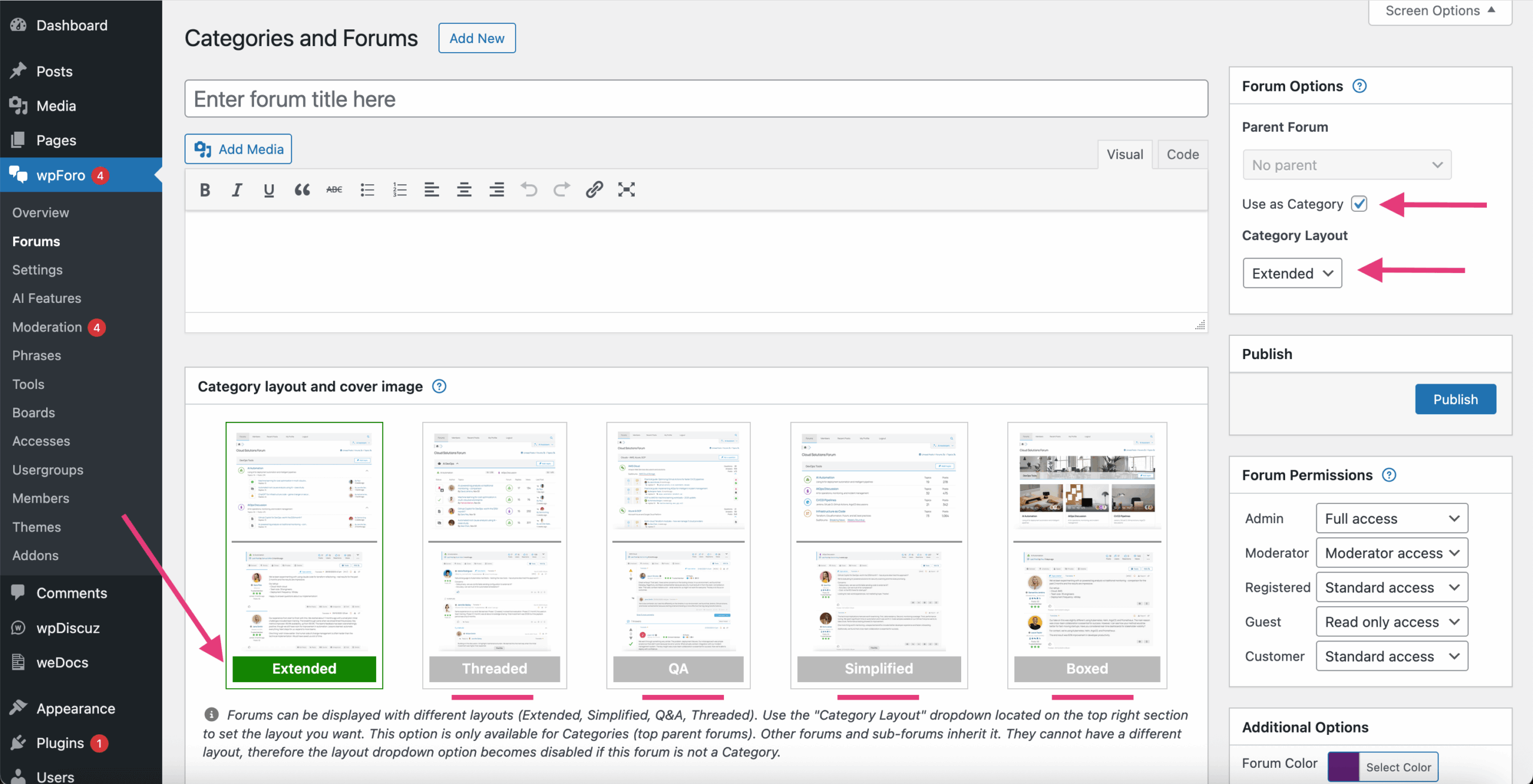
The main two advantages and uniqueness of wpForo are Forum Layouts and ability to create Multi-layout Forums. You can configure and display different categories of your forum with different layouts, and the discussion board will have multi-layout structure. Currently, wpForo V3 comes with five layouts:
- Extended Layout: Classic forum layout with a unique feature to show one level deeper information in advance. You can see the latest topics of each forum on Forum List and latest posts of each topic on Topic List.
- Simplified Layout: Light, modern and beautiful forum layout with topic and post author avatars on forum and topic lists.
- Question and Answer Layout: Complete Question & Answers discussion board for professional support and for communities similar to Stack Overflow. Perfect platform for users to ask and answer questions, and, through membership and active participation, to vote up or down.
- Threaded Layout: You can use this layout for any kind of discussions, especially for support forums, support tickets, product reviewing discussions and thread oriented forums (small number of categories and forums, even just one forum)
- Boxed Layout: NEW Brand new modern card-based design with beautiful visual presentation. Features elegant forum cards with icons, hover effects, and grid organization. The most visually striking layout, perfect for communities that want a contemporary, magazine-style appearance.
You can set forum layouts in top/parent Category settings. Child forums’ layout depends on the top category (blue panels) layout. They cannot have a different layout.